The end of February Michael upgraded our phone plan and with it came new free phones. I upgraded from a little flip phone to an iPhone. I fell in love with my iPhone from just moments of using it. Really I know it sounds silly to say that, but it has given me so much.
It has given new me ways in being connected with friends and family besides email and phone - now I have texting and facetime. I have the camera - which I hate saying - I use more than my little camera Michael got me for my birthday, but I love the apps that I can use on the photos and so that is why I use it more.
It is has kept me more organized - I have a shopping list, reminders, calendars and lists. I now have lists for items we are needing for our home that I am always looking for a good deal. I have measurements stored on my phone for windows and areas that I am looking for organization. I have addresses to mail out cards and snail mail on the fly now. I have lists of meds and keeping track of my health so that I can have on hand at my next check up.
Add in all the fun stuff apps for photos - I am just blown away what I can do with photos. Before with my little digital camera I would have to download my photos, open photoshop to edit and then upload on the web - facebook and blog. Now I can do all that on my phone in one place and post easily to the web.
There are also apps for my interests and just things that match my lifestyle. I have a couple apps for meditation and poetry. I don't have any cooking apps on my phone, but we do have them on the iPad which I find easier for recipes and using in the kitchen then my little phone.
So thought I would share my top 10 favorite apps....
 |
| Photo Edited with Wood Camera |
1.
Instagram - along with the Facebook app - Instagram is one of those thing I check right away and often throughout my day. I just love the photos. I love seeing little moments in people's lives from all across the world.
2.
Wood Camera - this is one I paid for and it is my favorite photo editing app for iPhone that is very easy to use. I love it. I love the filters, textures and how it crops and then I can post straight from the app to Instagram or many other options really easily.
3.
A Beautiful Mess - I just downloaded this one recently and it is a paid app also. I think it will really be wonderful for adding lines of poetry to a photo. The features I love on it - you can add text, doodles and preset words. My problem with this app is that they have lots of paid add-ons and I think they lack filters also. But I do like the doodles and the fonts included and know I will enjoy it without adding on any of the others so that is why it still makes my top 10.
4.
Grocery IQ - I use this for my grocery list. You can scan items in which I did when I first downloaded it - I went through my pantry and fridge to add things to it. It syncs with other's so Michael has it on his phone so if I need something on the way home I just add it to a list and have him look on it.
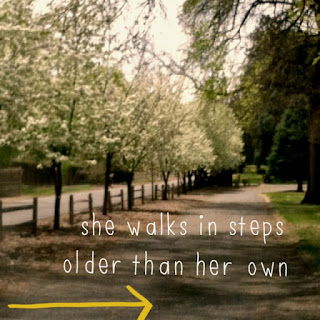 |
Photo edited with A Beautiful Mess - added a line from
one of my poems |
5.
Springpad - I have used it on the web for several years, but really like it on my phone too. It has "notebooks" so I have notebooks for several topics and projects. I can add photos, recordings, notes, task lists to each notebook. It is really nice way to keep things organized. I have home projects, poetry notebook so I can save words for a word toolbox, I have art projects - for ideas and inspiration for things I want to create. Just all sorts of notebooks for each project and topic in my life.
6.
Dropbox - I use Dropbox for backing up my photos from my phone. I also like that if I need a document or pdf I can put it in dropbox and then know I can access on my phone or another computer easily.
7.
Pinterest - I love Pinterest in general so having on my phone was a must. It is a great way to sit and waste time when sitting in a waiting room.
8.
Good Reads - I have used Goodreads.com on the web for years and I am so thankful to have it on my phone. I can scan the barcode on the books and have it added to my book list so easily. It is also nice to have when at the library or a bookstore so if I can't remember if I read a book or not I can pull out my phone and look at Good Reads to see all the books I have read or also look at my to-read book so I can find something I have been meaning to read before.
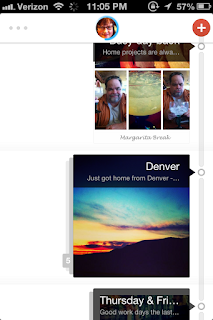 |
Screen Cap of entry page of Flava.
It shows several journal entries with
the photos I used in the entries. |
9.
Flava - I love to document my life so this is a journal. You can add photos, recordings, music, what movie you are watching or book you are reading, location, add links, tags and it automatically adds in the weather. I just like the interface and how it looks.
10.
Poetry Slam - This app will give you the first line if you want to create a poem. Then you can add your own words, but also has buttons to give you nouns, verbs, adjectives and so on if you want help. It allows you to save your poem after you are done with it. It is just been fun to play with when I feel a little creative, but need a little help with words.


